
Diffusers documentation
SDXL Turbo
SDXL Turbo
Stable Diffusion XL (SDXL) Turbo was proposed in Adversarial Diffusion Distillation by Axel Sauer, Dominik Lorenz, Andreas Blattmann, and Robin Rombach.
The abstract from the paper is:
We introduce Adversarial Diffusion Distillation (ADD), a novel training approach that efficiently samples large-scale foundational image diffusion models in just 1–4 steps while maintaining high image quality. We use score distillation to leverage large-scale off-the-shelf image diffusion models as a teacher signal in combination with an adversarial loss to ensure high image fidelity even in the low-step regime of one or two sampling steps. Our analyses show that our model clearly outperforms existing few-step methods (GANs,Latent Consistency Models) in a single step and reaches the performance of state-of-the-art diffusion models (SDXL) in only four steps. ADD is the first method to unlock single-step, real-time image synthesis with foundation models.
Tips
- SDXL Turbo uses the exact same architecture as SDXL, which means it also has the same API. Please refer to the SDXL API reference for more details.
- SDXL Turbo should disable guidance scale by setting
guidance_scale=0.0. - SDXL Turbo should use
timestep_spacing='trailing'for the scheduler and use between 1 and 4 steps. - SDXL Turbo has been trained to generate images of size 512x512.
- SDXL Turbo is open-access, but not open-source meaning that one might have to buy a model license in order to use it for commercial applications. Make sure to read the official model card to learn more.
Check out the Stability AI Hub organization for the official base and refiner model checkpoints!
Make sure you have the following libraries installed.
# uncomment to install the necessary libraries in Colab
#!pip install -q diffusers transformers accelerate
Load model checkpoints
Model weights may be stored in separate subfolders on the Hub or locally, in which case, you should use the from_pretrained() method:
from diffusers import AutoPipelineForText2Image
import torch

pipeline = AutoPipelineForText2Image.from_pretrained("stabilityai/sdxl-turbo", torch_dtype=torch.float16, variant="fp16")
pipeline = pipeline.to("cuda")
You can also use the from_single_file() method to load a model checkpoint stored in a single file format (.ckpt or .safetensors) from the Hub or locally. For this loading method, you need to set timestep_spacing="trailing" (feel free to experiment with the other scheduler config values to get better results):
from diffusers import StableDiffusionXLPipeline, EulerAncestralDiscreteScheduler
import torch

pipeline = StableDiffusionXLPipeline.from_single_file(
    "https://huggingface.co/stabilityai/sdxl-turbo/blob/main/sd_xl_turbo_1.0_fp16.safetensors",
    torch_dtype=torch.float16, variant="fp16")
pipeline = pipeline.to("cuda")
pipeline.scheduler = EulerAncestralDiscreteScheduler.from_config(pipeline.scheduler.config, timestep_spacing="trailing")
Text-to-image
For text-to-image, pass a text prompt. By default, SDXL Turbo generates a 512x512 image, and that resolution gives the best results. You can try setting the height and width parameters to 768x768 or 1024x1024, but you should expect quality degradations when doing so.
Make sure to set guidance_scale to 0.0 to disable, as the model was trained without it. A single inference step is enough to generate high quality images.
Increasing the number of steps to 2, 3 or 4 should improve image quality.
from diffusers import AutoPipelineForText2Image
import torch

pipeline_text2image = AutoPipelineForText2Image.from_pretrained("stabilityai/sdxl-turbo", torch_dtype=torch.float16, variant="fp16")
pipeline_text2image = pipeline_text2image.to("cuda")

prompt = "A cinematic shot of a baby racoon wearing an intricate italian priest robe."

image = pipeline_text2image(prompt=prompt, guidance_scale=0.0, num_inference_steps=1).images[0]
image
Image-to-image
For image-to-image generation, make sure that num_inference_steps * strength is larger or equal to 1.
The image-to-image pipeline will run for int(num_inference_steps * strength) steps, e.g. 0.5 * 2.0 = 1 step in
our example below.
from diffusers import AutoPipelineForImage2Image
from diffusers.utils import load_image, make_image_grid

# use from_pipe to avoid consuming additional memory when loading a checkpoint
pipeline_image2image = AutoPipelineForImage2Image.from_pipe(pipeline_text2image).to("cuda")

init_image = load_image("https://huggingface.co/datasets/huggingface/documentation-images/resolve/main/diffusers/cat.png")
init_image = init_image.resize((512, 512))

prompt = "cat wizard, gandalf, lord of the rings, detailed, fantasy, cute, adorable, Pixar, Disney, 8k"

image = pipeline_image2image(prompt, image=init_image, strength=0.5, guidance_scale=0.0, num_inference_steps=2).images[0]
make_image_grid([init_image, image], rows=1, cols=2)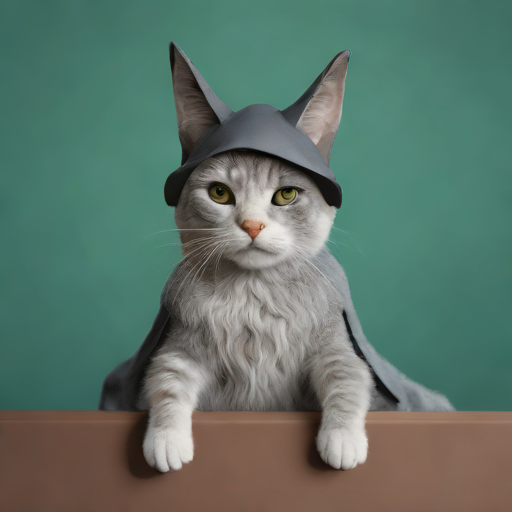
Speed-up SDXL Turbo even more
- Compile the UNet if you are using PyTorch version 2.0 or higher. The first inference run will be very slow, but subsequent ones will be much faster.
pipe.unet = torch.compile(pipe.unet, mode="reduce-overhead", fullgraph=True)- When using the default VAE, keep it in
float32to avoid costlydtypeconversions before and after each generation. You only need to do this one before your first generation:
pipe.upcast_vae()
As an alternative, you can also use a 16-bit VAE created by community member @madebyollin that does not need to be upcasted to float32.