Instructions to use Hyggge/EgoMind-7B with libraries, inference providers, notebooks, and local apps. Follow these links to get started.
- Libraries
- Transformers
How to use Hyggge/EgoMind-7B with Transformers:
# Use a pipeline as a high-level helper from transformers import pipeline pipe = pipeline("image-text-to-text", model="Hyggge/EgoMind-7B") messages = [ { "role": "user", "content": [ {"type": "image", "url": "https://huggingface.co/datasets/huggingface/documentation-images/resolve/main/p-blog/candy.JPG"}, {"type": "text", "text": "What animal is on the candy?"} ] }, ] pipe(text=messages)# Load model directly from transformers import AutoProcessor, AutoModelForImageTextToText processor = AutoProcessor.from_pretrained("Hyggge/EgoMind-7B") model = AutoModelForImageTextToText.from_pretrained("Hyggge/EgoMind-7B") messages = [ { "role": "user", "content": [ {"type": "image", "url": "https://huggingface.co/datasets/huggingface/documentation-images/resolve/main/p-blog/candy.JPG"}, {"type": "text", "text": "What animal is on the candy?"} ] }, ] inputs = processor.apply_chat_template( messages, add_generation_prompt=True, tokenize=True, return_dict=True, return_tensors="pt", ).to(model.device) outputs = model.generate(**inputs, max_new_tokens=40) print(processor.decode(outputs[0][inputs["input_ids"].shape[-1]:])) - Notebooks
- Google Colab
- Kaggle
- Local Apps
- vLLM
How to use Hyggge/EgoMind-7B with vLLM:
Install from pip and serve model
# Install vLLM from pip: pip install vllm # Start the vLLM server: vllm serve "Hyggge/EgoMind-7B" # Call the server using curl (OpenAI-compatible API): curl -X POST "http://localhost:8000/v1/chat/completions" \ -H "Content-Type: application/json" \ --data '{ "model": "Hyggge/EgoMind-7B", "messages": [ { "role": "user", "content": [ { "type": "text", "text": "Describe this image in one sentence." }, { "type": "image_url", "image_url": { "url": "https://cdn.britannica.com/61/93061-050-99147DCE/Statue-of-Liberty-Island-New-York-Bay.jpg" } } ] } ] }'Use Docker
docker model run hf.co/Hyggge/EgoMind-7B
- SGLang
How to use Hyggge/EgoMind-7B with SGLang:
Install from pip and serve model
# Install SGLang from pip: pip install sglang # Start the SGLang server: python3 -m sglang.launch_server \ --model-path "Hyggge/EgoMind-7B" \ --host 0.0.0.0 \ --port 30000 # Call the server using curl (OpenAI-compatible API): curl -X POST "http://localhost:30000/v1/chat/completions" \ -H "Content-Type: application/json" \ --data '{ "model": "Hyggge/EgoMind-7B", "messages": [ { "role": "user", "content": [ { "type": "text", "text": "Describe this image in one sentence." }, { "type": "image_url", "image_url": { "url": "https://cdn.britannica.com/61/93061-050-99147DCE/Statue-of-Liberty-Island-New-York-Bay.jpg" } } ] } ] }'Use Docker images
docker run --gpus all \ --shm-size 32g \ -p 30000:30000 \ -v ~/.cache/huggingface:/root/.cache/huggingface \ --env "HF_TOKEN=<secret>" \ --ipc=host \ lmsysorg/sglang:latest \ python3 -m sglang.launch_server \ --model-path "Hyggge/EgoMind-7B" \ --host 0.0.0.0 \ --port 30000 # Call the server using curl (OpenAI-compatible API): curl -X POST "http://localhost:30000/v1/chat/completions" \ -H "Content-Type: application/json" \ --data '{ "model": "Hyggge/EgoMind-7B", "messages": [ { "role": "user", "content": [ { "type": "text", "text": "Describe this image in one sentence." }, { "type": "image_url", "image_url": { "url": "https://cdn.britannica.com/61/93061-050-99147DCE/Statue-of-Liberty-Island-New-York-Bay.jpg" } } ] } ] }' - Docker Model Runner
How to use Hyggge/EgoMind-7B with Docker Model Runner:
docker model run hf.co/Hyggge/EgoMind-7B
EgoMind: Activating Spatial Cognition through Linguistic Reasoning in MLLMs
Zhenghao Chen1,2, Huiqun Wang1,2, Di Huang1,2✉
1State Key Laboratory of Complex and Critical Software Environment, Beihang University
2School of Computer Science and Engineering, Beihang University
✨ News
- [2026.04.07] 🎉🎉 We have released the model weights and the evaluation code!
- [2026.04.01] 🎉We have released our paper on arXiv!
- [2026.02.21] 🎉 Our paper has been accepted to CVPR 2026!
🚀 Framework
EgoMind is a Chain-of-Thought (CoT) framework that enables geometry-free spatial reasoning through two key components:
- Role-Play Caption (RPC): Simulates an agent navigating an environment from a first-person perspective, generating coherent descriptions of frame-wise observations and viewpoint transitions to build a consistent global understanding of the scene.
- Progressive Spatial Analysis (PSA): First localizes objects explicitly mentioned in the query, then expands its attention to surrounding entities, and finally reasons about their spatial relationships in an integrated manner.
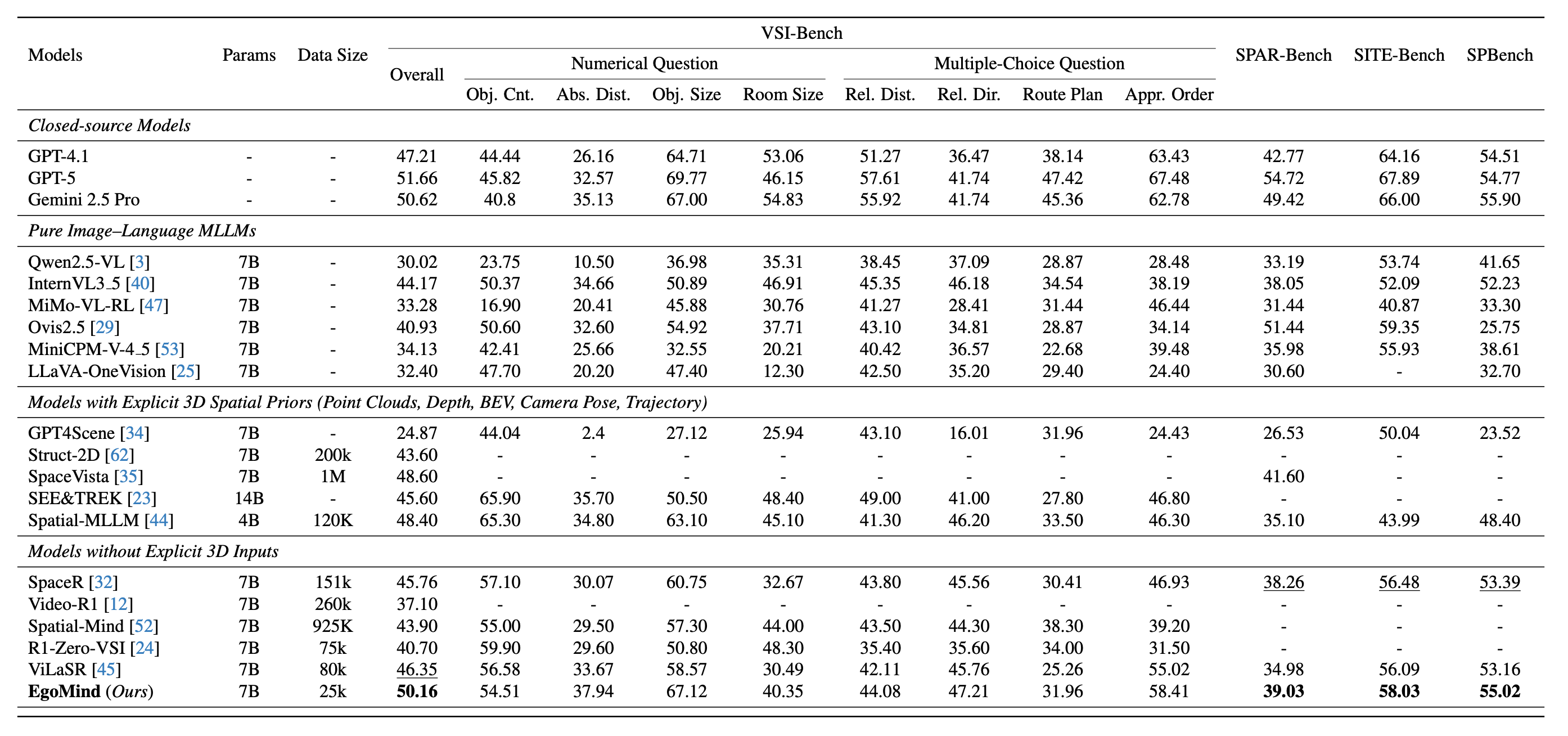
With only 5K auto-generated SFT samples and 20K RL samples, EgoMind achieves competitive results on VSI-Bench, SPAR-Bench, SITE-Bench, and SPBench, demonstrating the potential of linguistic reasoning for spatial cognition.
🏆 Main Results
EgoMind achieves competitive performance among open-source MLLMs across four spatial reasoning benchmarks, using only 25K training samples (5K CoT-supervised + 20K RL) without any explicit 3D priors.
🔬 Evaluation
1. Environment Installation
# Create and activate a Conda environment (Python 3.11)
conda create -n egomind python=3.11 -y
conda activate egomind
# Install uv, PyTorch, and project dependencies
pip install uv
uv pip install torch==2.6.0 torchvision==0.21.0 torchaudio==2.6.0 --index-url https://download.pytorch.org/whl/cu124
uv pip install -r requirements.txt
2. Model Preparation
Download the model weights into the repo’s models/ directory (from the EgoMind repository root). Requires Hugging Face CLI (pip install huggingface_hub).
huggingface-cli download Hyggge/EgoMind-7B --resume-download --local-dir ./models/EgoMind-7B
After this, point --model_path to models/EgoMind-7B for local inference, or keep using Hyggge/EgoMind-7B to load from the Hub.
3. Dataset Preparation
Download the benchmark data and place them under evaluation/datasets/. See evaluation/datasets/README.md for detailed instructions.
The expected directory structure:
evaluation/datasets/
├── VSI-Bench/
│ ├── qa_processed.jsonl
│ └── data/ # arkitscenes/, scannet/, scannetpp/
├── SPAR-Bench/
│ ├── qa_processed.jsonl
│ └── data/ # images/
├── SITE-Bench/
│ ├── qa_processed.jsonl
│ └── data/ # ActivityNet/, MLVU/, MVBench/, ...
└── SPBench/
├── qa_processed.jsonl
└── data/ # SPBench-MV-images/, SPBench-SI-images/
4. Running Evaluation
All benchmarks share the same entry point evaluation/run_eval.py. Below are the commands for each benchmark.
VSI-Bench
python evaluation/run_eval.py \
--model_path models/EgoMind-7B \
--output_path outputs/vsibench.jsonl \
--benchmark vsibench
SPAR-Bench
python evaluation/run_eval.py \
--model_path models/EgoMind-7B \
--output_path outputs/sparbench.jsonl \
--benchmark sparbench
SITE-Bench
python evaluation/run_eval.py \
--model_path models/EgoMind-7B \
--output_path outputs/sitebench.jsonl \
--benchmark sitebench
SPBench
python evaluation/run_eval.py \
--model_path models/EgoMind-7B \
--output_path outputs/spbench.jsonl \
--benchmark spbench
Calculate the metric using existing outputs only (skip inference):
python evaluation/run_eval.py \
--output_path outputs/vsibench.jsonl \
--benchmark vsibench \
--only_eval
📜 Citation
If you find our work helpful, please consider citing our paper:
@misc{chen2026egomind,
title={EgoMind: Activating Spatial Cognition through Linguistic Reasoning in MLLMs},
author={Zhenghao Chen and Huiqun Wang and Di Huang},
year={2026},
eprint={2604.03318},
archivePrefix={arXiv},
primaryClass={cs.CV},
url={https://arxiv.org/abs/2604.03318},
}
- Downloads last month
- 92