
Eyas: AI Security Camera Agent



Project Links
Why we built this
One of our teammates has family who runs a small retail shop, and shoplifting is something they deal with regularly.
Like a lot of small businesses, the store already has CCTV cameras covering the aisles, the entrance, and the counter. But watching every feed at once is not realistic, especially when the store gets busy. Shoplifters know this. They tend to pick the crowded moments.
When an owner suspects something was taken, they can't just accuse someone. They have to go back through the footage, find the right clip, confirm what happened, and figure out what was stolen. By then, the person is gone.
The financial loss stings, but the emotional side is often worse. Repeated theft makes owners second-guess every customer. It's stressful, and because individual incidents seem small, a lot of owners stop reporting it altogether.
"Security cameras are usually used to identify a shoplifter after an incident has already happened." 보안카메라는 보통 일이 다 끝난 다음에 절도자를 확인하는 용도로 쓰이잖아요.
That is the gap we wanted to close. Not after the fact, but in the moment.
"A simple alert like 'you might want to check this' would allow us to act right away and potentially prevent shoplifting." 지금처럼 "이건 확인이 한 번 필요하다"는 식으로 알려주기만 해도, 바로 움직여서 상황을 막을 수 있거든요.
If the system can flag something suspicious while it is happening, the owner has a chance to respond before the person leaves. The goal is not to replace anyone's judgment. It is just to give small shop owners an extra set of eyes when they can't watch everything themselves.
The pipeline design
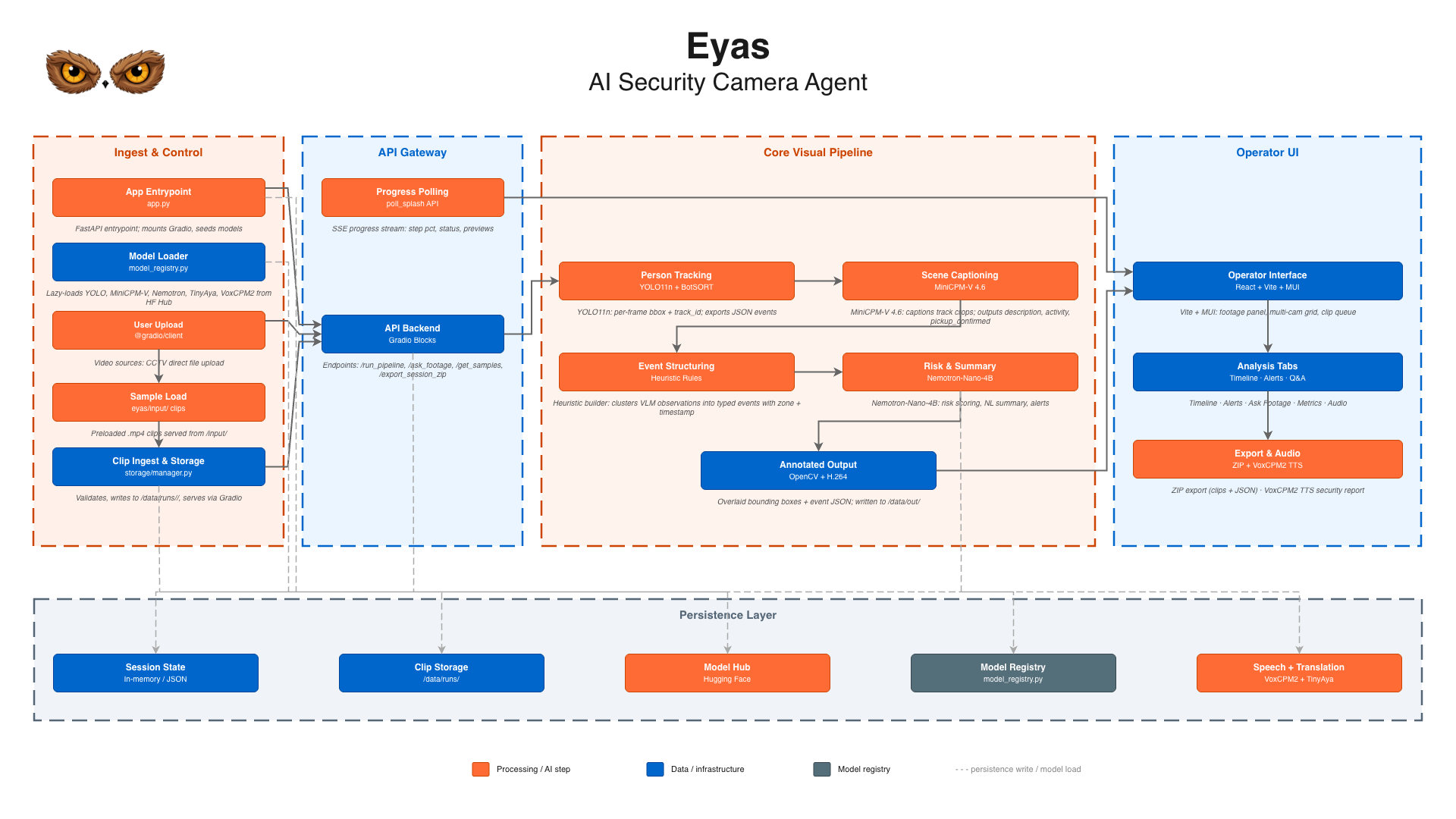
We went through a few designs before landing on the one we shipped.
Our first instinct: VLM end-to-end
Run the vision-language model directly on video. Every N frames, ask the VLM "is anything suspicious happening?" This worked in the notebook but was slow and produced walls of narrative text with no structure. We couldn't reliably extract when or where from the output.
What we actually shipped
YOLO11n (6 MB)          : detect and track people frame by frame
     ↓  track crops
MiniCPM-V 4.6 (1.3B)   : observe each tracked person, produce structured JSON
     ↓  PersonObservation[]
heuristic structurer    : convert observations into typed events with timestamps
     ↓  Event[]
Nemotron 3 Nano 4B      : reason over the event log, answer questions, write the report
     ↓  summary / alert text
TinyAya (1B)            : translate output to Korean on demand
     ↓  Korean text
VoxCPM2 (2.4B)         : synthesize a spoken audio brief
The key insight was putting a heuristic structurer between the VLM and the LLM. It converts the VLM's observations into typed events before the LLM ever sees them. The LLM never touches raw pixels; it reasons over structured JSON. That made the LLM's job much simpler and its outputs far more consistent.
Lessons from each stage
YOLO + BotSORT: fast, but crops matter a lot
YOLO11n is fast even on CPU. BotSORT tracking holds up well across most camera angles.
The tricky part was deciding which frames to send to the VLM. The event structurer maintains a 2-second evidence window and samples up to 5 frames from it (the evidence_frames default) to give the model enough temporal context without running on every frame.
Crop size mattered more than we expected. When a person is partially cut off or in poor lighting, the VLM produces vague descriptions. Adding a fixed 120px padding around each bounding box (crop_pad=120) gave the VLM enough context to pick up on interactions with nearby objects.
MiniCPM-V 4.6: good observer, but conservative
MiniCPM-V 4.6 was not trained on security footage, but it handles CCTV surprisingly well. Show it a crop of someone reaching toward a shelf and it will often note "person appearing to pick up or handle item." It doesn't pretend to see things it can't confirm.
The catch is that it won't call a pickup confirmed unless it's very sure. Low resolution, oblique angles, partial occlusion, any of those will push it toward pickup_confirmed: false even when something clearly happened. We ended up relying on the description text more than the boolean field. The heuristics layer picks up the slack.
We prompt the VLM to return structured JSON with description, activity, held_objects, pickup_confirmed, and picked_up_items. It doesn't always come back clean, so parse_person_observation strips markdown fences and falls back to regex extraction for individual fields if json.loads fails.
Event structuring: the part nobody talks about
This layer has no model. It's a set of heuristics over the observation stream: dwell time per zone, pickup confirmation threshold, track-exit events, loitering detection.
Getting the timing right took longer than any of the model integrations. Emit events too early and you get noise. Wait until a track ends and you miss long-duration loiterers. We landed on a sliding evidence buffer: emit when either the track ends or the buffer accumulates consistent evidence past a threshold.
Zone assignment comes from the filename convention (20240608_120000_entrance.mp4 sets the zone to entrance). If the filename doesn't match, a fallback zone covers the full frame. This means the system works on arbitrary uploaded footage without any manual setup.
Nemotron 3 Nano 4B: prompting matters more than model size
Nemotron 3 Nano 4B via llama-cpp-python handles summarization, risk assessment, Q&A, and the TTS script.
Free-form summaries work fine. For structured JSON outputs (risk_level, flags[], suspicious_clips[]) we use response_format={"type": "json_object"} (JSON mode) via llama.cpp, which is more reliable than prompting for JSON without constraints. Q&A and the audio script use free-form generation.
One unsolved problem: the 4,096-token context window fills up on a busy recording with 50+ events. We trim by recency and priority, keeping pickups and high-confidence events. The real fix would be a retrieval step before the LLM call, but we didn't have time for that.
Translation (TinyAya)
TinyAya runs via llama-cpp-python and caches outputs per source string.
We only run translation on LLM-generated text (summaries, alert narratives). UI strings come from a static i18n.js table. Routing every UI label through a GGUF model would have been too slow.
VoxCPM2 TTS: works great, but needs a GPU
VoxCPM2 generates spoken audio from the event summary. On a CUDA machine it sounds genuinely good, like a calm security system readout.
The downside is that it needs CUDA. On HF Spaces CPU tier or any machine without a GPU, we skip TTS and show an explanatory message in the Audio Report tab. The rest of the pipeline (events, summary, Q&A) is unaffected. We went in knowing TTS was the one non-CPU-friendly piece.
The frontend decision
The hackathon requires a Gradio app, not a Gradio UI.
gr.Blocks lets you expose the whole pipeline as Gradio API endpoints while serving a custom frontend as static files. The React frontend talks to Gradio via @gradio/client the same way the default UI would. From Gradio's side, nothing is different.
This was the right call for what we were building. The default Gradio layout would have made the tool feel like a form. A proper SPA with resizable panels, a scatter-chart event timeline, and a live progress view changes how the whole thing feels to use. It probably wouldn't have landed the same way with a Gradio Dataframe and a Gradio Video on the same page.
The cost was real. The frontend took significant time that could have gone into model experimentation. For a track where the UI is part of the judging, we think it was worth it.
What surprised us
The small models are more careful than we expected. Both MiniCPM-V and Nemotron hedge when they're not sure rather than making things up. For a security context that's actually what you want. A false negative is annoying; a confident false positive is worse.
The heuristic layer ended up mattering more than any individual model. The models do perception and reasoning. The structurer in the middle handles the domain logic: what makes something an event, how significant it is, which zone it belongs to. Tuning the heuristics had more impact on output quality than changing model parameters.
The llama.cpp ecosystem has gotten a lot easier to work with. Grammar-constrained JSON output from a 4B GGUF model via llama-cpp-python would have been a real project a couple of years ago. Now it's a few lines of setup.
The current design processes pre-loaded video clips and streams events to the UI as they're detected, so the timeline updates as the pipeline runs rather than all at once at the end. A natural next step would be real-time RTSP stream input, where the same pipeline runs continuously on live camera feeds.
What we'd do differently
Retrieval before the LLM. The 4k context window fills up quickly on long recordings. A small embedding model indexing events, with a retrieval step before the LLM call, would make Q&A more reliable across long sessions.
Better keyframe selection. Picking k=4 frames spread across a track's lifetime is simple but misses the most informative moments. Motion-based selection, frames with the highest optical flow, would be a better heuristic.
Fine-tune YOLO on retail footage. YOLO11n handles CCTV well enough off the shelf, but retail surveillance has specific characteristics (high angle, wide FOV, lower resolution) that a fine-tuned checkpoint would handle better.
TTS that works on CPU. VoxCPM2 needing CUDA turns the audio report into a feature that only works on better hardware. A smaller TTS model like Kokoro or Piper would make it available everywhere.
Field test: Joy Convenience Store
We filmed our social media post at Joy Convenience Store using mock camera angles to simulate what a real CCTV setup would look like. The demo footage comes from CCTV footage sourced from other stores, renamed and run through the pipeline to show what Eyas produces end-to-end.
Demo footage:
| File | YouTube |
|---|---|
20260608_120000_entrance.mp4 |
youtu.be/gIwwSLfHvE4 |
20260608_130000_counter.mp4 |
youtu.be/mgEsx1y5gqs |
Model and tool credits
- YOLO11n, Ultralytics
- MiniCPM-V 4.6, OpenBMB
- Nemotron 3 Nano 4B GGUF, NVIDIA
- TinyAya, Cohere Labs
- VoxCPM2, OpenBMB
- llama-cpp-python, Andrei Betlen et al.
- React, Vite, MUI, Recharts, Framer Motion
Eyas is open source. Space: build-small-hackathon/eyas