# reBot B601-DM
[reBot B601-DM](https://wiki.seeedstudio.com/rebot_arm_b601_dm_lerobot/) is an open-source, low-cost robot arm from Seeed Studio for embodied-AI and imitation learning. It comes as a **follower** arm (the `B601-DM`, a 6-DOF arm plus gripper driven by Damiao CAN motors) and a **leader** arm (the `StarArm102` / `reBot Arm 102`, driven by FashionStar UART smart servos) used to teleoperate it.
This page covers **calibration** and **teleoperation** for both single-arm and bimanual (dual-arm) setups.
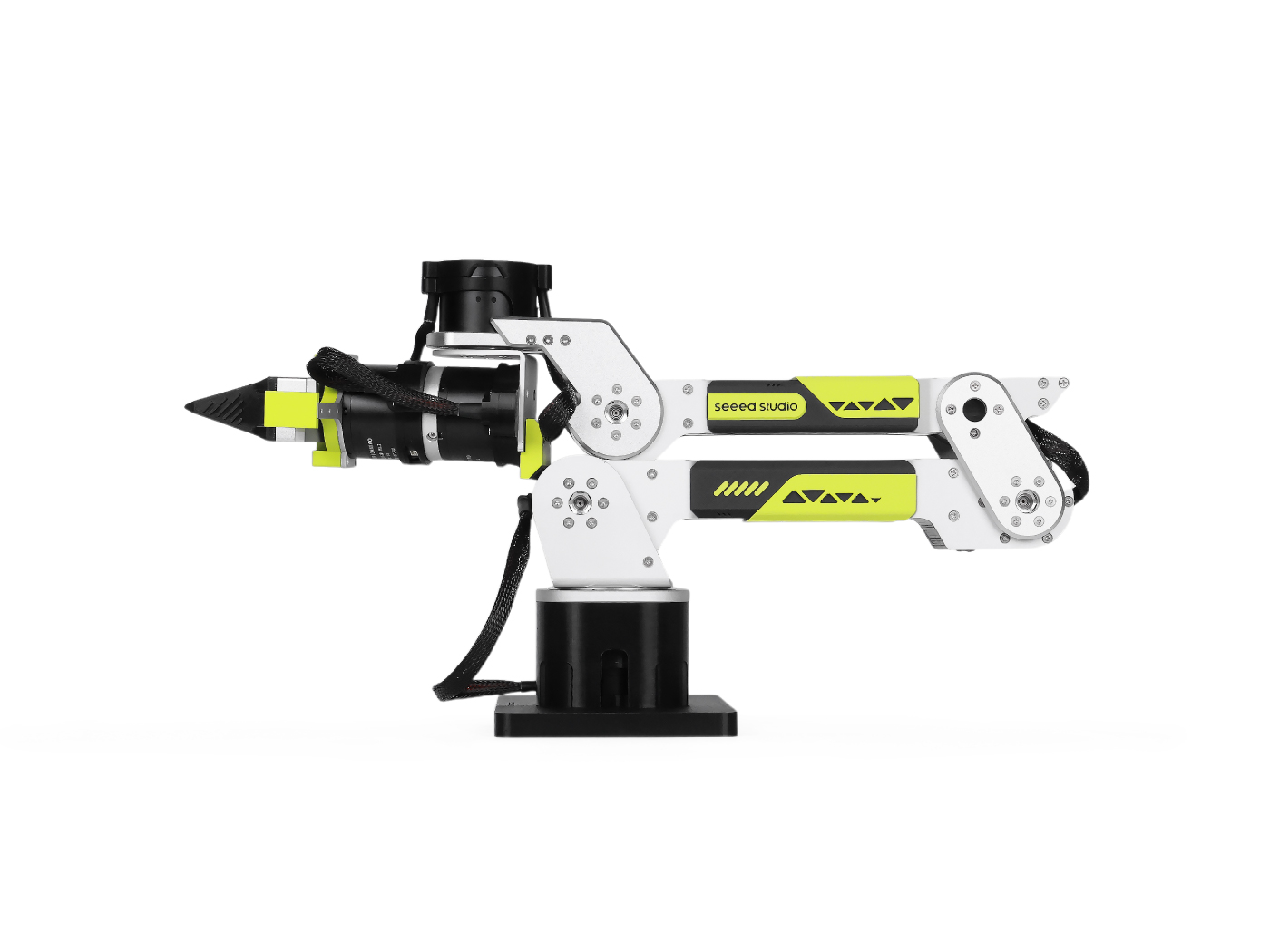
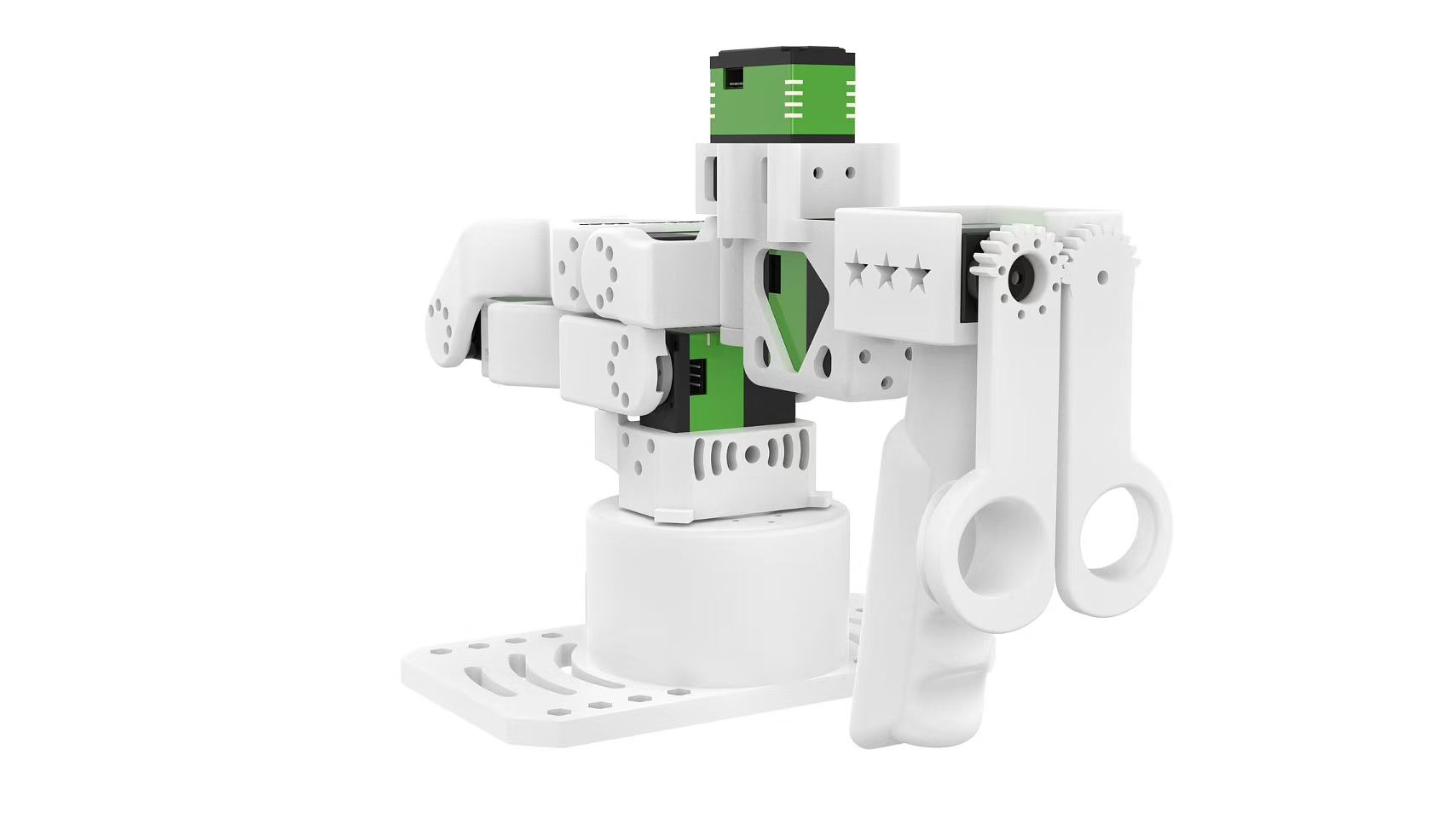 _Left: the B601-DM follower at its zero position. Right: the reBot Arm 102 leader at its zero position. Images courtesy of [Seeed Studio](https://wiki.seeedstudio.com/rebot_arm_b601_dm_lerobot/)._
## Install LeRobot 🤗
Follow our [Installation Guide](./installation), then install the reBot support:
```bash
pip install -e ".[rebot]"
```
This pulls in `motorbridge` (CAN motor control for the B601-DM follower) and `motorbridge-smart-servo` (FashionStar UART servos for the reBot Arm 102 leader).
## Registered device types
| Type | Kind |
| ------------------------ | -------------------------------------------- |
| `rebot_b601_follower` | single-arm B601-DM follower robot |
| `bi_rebot_b601_follower` | bimanual (dual-arm) follower robot |
| `rebot_102_leader` | single-arm reBot Arm 102 leader teleoperator |
| `bi_rebot_102_leader` | bimanual (dual-arm) leader teleoperator |
The bimanual types compose two single-arm instances and namespace each arm's
observation/action keys with a `left_` / `right_` prefix. Per-arm settings are
passed through nested `left_arm_config.*` / `right_arm_config.*` arguments.
## Find the USB ports
For each device, find the USB port associated with its motor bus using:
```bash
lerobot-find-port
```
On Linux, remove `brltty` (`sudo apt remove brltty`) so it does not hold the
leader's USB serial port. You may also need to grant access to the serial
devices: `sudo chmod 666 /dev/ttyACM* /dev/ttyUSB*`.
## Calibration
Neither arm stores a persistent hardware calibration: every time it connects, the motors are re-zeroed against the pose the arm is physically holding. Calibration simply records that zero pose. When prompted, **manually move the arm to its zero position** (the default sit-down pose shown above, gripper fully closed) and press ENTER.
### Follower (B601-DM)
```bash
lerobot-calibrate \
--robot.type=rebot_b601_follower \
--robot.port=/dev/ttyACM0 \
--robot.id=follower \
--robot.can_adapter=damiao
```
Connect the bimanual follower; calibration runs for the left arm, then the right arm.
```bash
lerobot-calibrate \
--robot.type=bi_rebot_b601_follower \
--robot.id=bi_follower \
--robot.left_arm_config.port=/dev/ttyACM0 \
--robot.left_arm_config.can_adapter=damiao \
--robot.right_arm_config.port=/dev/ttyACM1 \
--robot.right_arm_config.can_adapter=damiao
```
Per-arm calibration files are saved with `_left` / `_right` suffixes on the id.
### Leader (reBot Arm 102)
```bash
lerobot-calibrate \
--teleop.type=rebot_102_leader \
--teleop.port=/dev/ttyUSB0 \
--teleop.id=leader
```
```bash
lerobot-calibrate \
--teleop.type=bi_rebot_102_leader \
--teleop.id=bi_leader \
--teleop.left_arm_config.port=/dev/ttyUSB0 \
--teleop.right_arm_config.port=/dev/ttyUSB1
```
## Teleoperation
Once both arms are calibrated, drive the follower with the leader. The follower talks to its CAN bus through a Damiao serial bridge (`can_adapter=damiao`, the default) or a SocketCAN adapter (`can_adapter=socketcan`). See the [OpenArm page](./openarm) for more details on the SocketCAN adapter configuration.
```bash
lerobot-teleoperate \
--robot.type=rebot_b601_follower \
--robot.port=/dev/ttyACM0 \
--robot.id=follower \
--robot.can_adapter=damiao \
--teleop.type=rebot_102_leader \
--teleop.port=/dev/ttyUSB0 \
--teleop.id=leader
```
The bimanual leader and follower reuse the single-arm classes; each arm is
configured through nested `left_arm_config.*` / `right_arm_config.*` arguments,
so a bimanual reBot Arm 102 leader drives a bimanual B601-DM follower.
```bash
lerobot-teleoperate \
--robot.type=bi_rebot_b601_follower \
--robot.id=bi_follower \
--robot.left_arm_config.port=/dev/ttyACM0 \
--robot.left_arm_config.can_adapter=damiao \
--robot.right_arm_config.port=/dev/ttyACM1 \
--robot.right_arm_config.can_adapter=damiao \
--teleop.type=bi_rebot_102_leader \
--teleop.id=bi_leader \
--teleop.left_arm_config.port=/dev/ttyUSB0 \
--teleop.right_arm_config.port=/dev/ttyUSB1
```
The leader and follower share the same joint names (`shoulder_pan,
shoulder_lift, elbow_flex, wrist_flex, wrist_yaw, wrist_roll, gripper`), so
leader actions map directly onto the follower.
If the motion of a joint is reversed, flip its sign in the leader's `joint_directions` (the gripper also carries a scale to widen its range to the follower):
```bash
lerobot-teleoperate \
--robot.type=rebot_b601_follower \
--robot.port=/dev/ttyACM0 \
--robot.can_adapter=damiao \
--teleop.type=rebot_102_leader \
--teleop.port=/dev/ttyUSB0 \
--teleop.joint_directions='{"shoulder_pan":-1,"shoulder_lift":-1,"elbow_flex":1,"wrist_flex":1,"wrist_yaw":1,"wrist_roll":-1,"gripper":-6}'
```
## Recording datasets
Swap `lerobot-teleoperate` for `lerobot-record` (with the same `--robot.*` / `--teleop.*` arguments, plus `--dataset.*`) to record demonstrations for training. See [Imitation Learning for Robots](./il_robots) for the full workflow.
For hardware assembly and wiring, see the [Seeed Studio reBot wiki](https://wiki.seeedstudio.com/rebot_arm_b601_dm_lerobot/).
_Left: the B601-DM follower at its zero position. Right: the reBot Arm 102 leader at its zero position. Images courtesy of [Seeed Studio](https://wiki.seeedstudio.com/rebot_arm_b601_dm_lerobot/)._
## Install LeRobot 🤗
Follow our [Installation Guide](./installation), then install the reBot support:
```bash
pip install -e ".[rebot]"
```
This pulls in `motorbridge` (CAN motor control for the B601-DM follower) and `motorbridge-smart-servo` (FashionStar UART servos for the reBot Arm 102 leader).
## Registered device types
| Type | Kind |
| ------------------------ | -------------------------------------------- |
| `rebot_b601_follower` | single-arm B601-DM follower robot |
| `bi_rebot_b601_follower` | bimanual (dual-arm) follower robot |
| `rebot_102_leader` | single-arm reBot Arm 102 leader teleoperator |
| `bi_rebot_102_leader` | bimanual (dual-arm) leader teleoperator |
The bimanual types compose two single-arm instances and namespace each arm's
observation/action keys with a `left_` / `right_` prefix. Per-arm settings are
passed through nested `left_arm_config.*` / `right_arm_config.*` arguments.
## Find the USB ports
For each device, find the USB port associated with its motor bus using:
```bash
lerobot-find-port
```
On Linux, remove `brltty` (`sudo apt remove brltty`) so it does not hold the
leader's USB serial port. You may also need to grant access to the serial
devices: `sudo chmod 666 /dev/ttyACM* /dev/ttyUSB*`.
## Calibration
Neither arm stores a persistent hardware calibration: every time it connects, the motors are re-zeroed against the pose the arm is physically holding. Calibration simply records that zero pose. When prompted, **manually move the arm to its zero position** (the default sit-down pose shown above, gripper fully closed) and press ENTER.
### Follower (B601-DM)
```bash
lerobot-calibrate \
--robot.type=rebot_b601_follower \
--robot.port=/dev/ttyACM0 \
--robot.id=follower \
--robot.can_adapter=damiao
```
Connect the bimanual follower; calibration runs for the left arm, then the right arm.
```bash
lerobot-calibrate \
--robot.type=bi_rebot_b601_follower \
--robot.id=bi_follower \
--robot.left_arm_config.port=/dev/ttyACM0 \
--robot.left_arm_config.can_adapter=damiao \
--robot.right_arm_config.port=/dev/ttyACM1 \
--robot.right_arm_config.can_adapter=damiao
```
Per-arm calibration files are saved with `_left` / `_right` suffixes on the id.
### Leader (reBot Arm 102)
```bash
lerobot-calibrate \
--teleop.type=rebot_102_leader \
--teleop.port=/dev/ttyUSB0 \
--teleop.id=leader
```
```bash
lerobot-calibrate \
--teleop.type=bi_rebot_102_leader \
--teleop.id=bi_leader \
--teleop.left_arm_config.port=/dev/ttyUSB0 \
--teleop.right_arm_config.port=/dev/ttyUSB1
```
## Teleoperation
Once both arms are calibrated, drive the follower with the leader. The follower talks to its CAN bus through a Damiao serial bridge (`can_adapter=damiao`, the default) or a SocketCAN adapter (`can_adapter=socketcan`). See the [OpenArm page](./openarm) for more details on the SocketCAN adapter configuration.
```bash
lerobot-teleoperate \
--robot.type=rebot_b601_follower \
--robot.port=/dev/ttyACM0 \
--robot.id=follower \
--robot.can_adapter=damiao \
--teleop.type=rebot_102_leader \
--teleop.port=/dev/ttyUSB0 \
--teleop.id=leader
```
The bimanual leader and follower reuse the single-arm classes; each arm is
configured through nested `left_arm_config.*` / `right_arm_config.*` arguments,
so a bimanual reBot Arm 102 leader drives a bimanual B601-DM follower.
```bash
lerobot-teleoperate \
--robot.type=bi_rebot_b601_follower \
--robot.id=bi_follower \
--robot.left_arm_config.port=/dev/ttyACM0 \
--robot.left_arm_config.can_adapter=damiao \
--robot.right_arm_config.port=/dev/ttyACM1 \
--robot.right_arm_config.can_adapter=damiao \
--teleop.type=bi_rebot_102_leader \
--teleop.id=bi_leader \
--teleop.left_arm_config.port=/dev/ttyUSB0 \
--teleop.right_arm_config.port=/dev/ttyUSB1
```
The leader and follower share the same joint names (`shoulder_pan,
shoulder_lift, elbow_flex, wrist_flex, wrist_yaw, wrist_roll, gripper`), so
leader actions map directly onto the follower.
If the motion of a joint is reversed, flip its sign in the leader's `joint_directions` (the gripper also carries a scale to widen its range to the follower):
```bash
lerobot-teleoperate \
--robot.type=rebot_b601_follower \
--robot.port=/dev/ttyACM0 \
--robot.can_adapter=damiao \
--teleop.type=rebot_102_leader \
--teleop.port=/dev/ttyUSB0 \
--teleop.joint_directions='{"shoulder_pan":-1,"shoulder_lift":-1,"elbow_flex":1,"wrist_flex":1,"wrist_yaw":1,"wrist_roll":-1,"gripper":-6}'
```
## Recording datasets
Swap `lerobot-teleoperate` for `lerobot-record` (with the same `--robot.*` / `--teleop.*` arguments, plus `--dataset.*`) to record demonstrations for training. See [Imitation Learning for Robots](./il_robots) for the full workflow.
For hardware assembly and wiring, see the [Seeed Studio reBot wiki](https://wiki.seeedstudio.com/rebot_arm_b601_dm_lerobot/).